AUTONOMOUS ROBOT

AUTONOMOUS ROBOT is one which drive forward until
it finds an edge. Once it finds an edge it will respond by backing away, reorienting
itself (so it doesn't drive straight into the same edge) and go forward
again.
Here is a circuit of autonomous robot which works very effectively and got
1.1st prize in EMISSION09 at VITAM COLLEGE OF ENGINEERING.
2.2nd prize in CENACLE09 at GITAM UNIVERSITY.
3.3rd prize in SPIKES09 at ANDHRA UNIVERSITY

Any queries and doubts about this circuit mail me to vigneshmailjunction@gmail.com


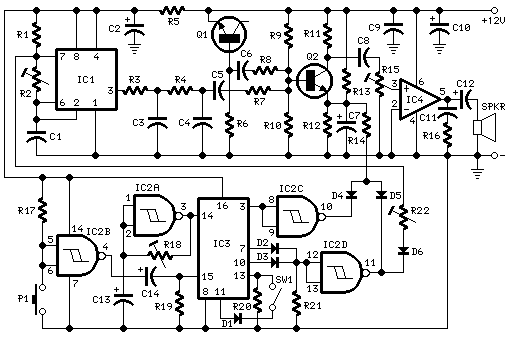
Cuckoo-song Generator


Cuckoo-song Generator


click to enlarge

Parts:R1,R5___________1K 1/4W Resistors
R2_____________50K 1/2W Trimmer Cermet
R3______________8K2 1/4W Resistor
R4_____________82K 1/4W Resistor
R6______________1M 1/4W Resistor
R7,R17,R20,R21_22K 1/4W Resistors
R8,R10,R11,R19_10K 1/4W Resistors
R9____________150K 1/4W Resistor
R12_____________4K7 1/4W Resistor
R13___________100K 1/4W Resistor
R14___________220R 1/4W Resistor
R15,R22________20K 1/2W Trimmers Cermet
R16____________10R 1/4W Resistor
R18___________200K 1/2W Trimmer Cermet
C1,C11_________47nF 63V Polyester or Ceramic Capacitors
C2,C10,C12____220µF 25V Electrolytic Capacitors
C3____________220nF 63V Polyester or Ceramic Capacitor
C4_____________22nF 63V Polyester or Ceramic Capacitor
C5,C6,C8,C9___100nF 63V Polyester or Ceramic Capacitors
C7,C13,C14_____10µF 63V Electrolytic Capacitors
D1,D2,D3,D6__1N4148 75V 150mA Diodes
D4,D5_________BAT46 100V 150mA Schottky-barrier Diodes
Q1,Q2_________BC547 45V 100mA NPN Transistors
IC1____________7555 or TS555CN CMos Timer IC
IC2____________4093 Quad 2 input Schmitt NAND Gate IC
IC3____________4017 Decade counter with 10 decoded outputs IC
IC4___________LM386 Audio power amplifier IC
P1_____________SPST Pushbutton
SW1____________SPST Switch
SPKR___________8 Ohm Loudspeaker
Comments:
This circuit generates a two-tone effect very much alike the cuckoo song. It can be used for door-bells or other purposes thanks to a built-in audio amplifier and loudspeakerUsed as a sound effect generator it can be connected to external amplifiers, tape recorders etc. In this case, the built-in audio amplifier and loudspeaker may be omitted and the output taken across C8 and ground.There are two options: free running, when SW1 is left open, and one-shot, when SW1 is closed. In this case a two-tone cuckoo song will be generated at each P1 pressing.
Circuit operation:
IC1 is wired as a square wave generator and produces both tones of the cuckoo song. The frequency of the higher one (667Hz) is set by means of Trimmer R2. When IC2D output goes low, a further Trimmer (R22) is added to IC1 timing components via D6, and the lower tone (545Hz) is generated.To imitate closely the cuckoo song, the square wave output of IC1 is converted to a quasi-sinusoidal wave form by R3, R4, C3 and C4, then mixed with the white noise generated by Q1, R6.Q2 has two purposes: it mixes the two incoming signals and gates the resulting tone, shaping its attack and decay behavior by means of the parts wired around its Emitter.IC4 is the audio power amplifier driving the speaker and R15 is the volume control.The various sound and pause timings for the circuit are provided by the clock generator IC2A driving the decade counter IC3. Some output pins of this IC are gated by IC2C, IC2D and related components to drive appropriately the sound generator and the sound gate.When SW1 is left open the circuit operates in the free-running mode and the cuckoo song is generated continuously. When SW1 is closed, the circuit generates two tones then stops, because a high state appears at the last output pin (#11) of the decade counter IC: therefore the count is inhibited by means of D1 feeding pin #13.The circuit is reset by a positive pulse at pin #15 of IC3 when P1 is pressed.
Setup:
Best results will be obtained if the two tones frequencies are set precisely, i.e. 667Hz for the first tone and 545Hz for the second: in musical terms this interval is called a Minor Third. Obviously a digital frequency counter, if available, would be the best tool to setup R2 and R22, but you can use a musical instrument, e.g. a piano or guitar, tuning-up the notes accurately by ear.
Disconnect temporarily R22 from D6 anode.
Connect the digital frequency counter to pin 3 of IC1.
Adjust R2 in order to read 667Hz on the display.
Connect R22 to negative ground and adjust it to read 545Hz on the display.
Restore R22 - D6 connection.
Tuning by ear:
Disconnect temporarily R22 from D6 anode.
Disconnect C8 from Q2 Collector and connect it to R4, C4 and C5 junction.
Adjust R2 in order that the tone generated by the loudspeaker is at the same pitch of the reference note generated by your musical instrument. This reference note will be the E written on the stave in the fourth space when using the treble clef.
Connect R22 to negative ground and adjust it in order that the tone generated by the loudspeaker is at the same pitch of the reference note generated by your musical instrument. This second reference note will be the C-sharp written on the stave in the third space when using the treble clef.
Restore R22 - D6 and C8 to Q2 Collector connections.
Notes:
The master clock can be adjusted by means of R18.
The percentage of hiss and sound in the mixing circuit, setting the tone character, can be varied changing R8 and R7 values respectively.
Any kind of dc voltage supply in the 12 - 15V range can be used, but please note that supply voltages below 12V will prevent operation of the white noise generator.
An amusing application of this circuit is to use a photo-resistor in place of P1, then placing the unit near the flashing lamps of your Christmas tree. A sweet cuckoo song will be heard each time the lamp chosen will illuminate.

Radio Wave Alarm

Radio Wave Alarm


Description:This simple circuit is sure to have the police beating a path to your door- however, it has the added advantage of alerting you to their presence even before their footsteps fall on the doormat.

click to enlarge

Circuit NotesThe circuit transmits on Medium Wave (this is the small problem with the police). IC1a, together with a sensor (try a 20cm x 20cm sheet of tin foil) oscillates at just over 1MHz. This is modulated by an audio frequency (a continuous beep) produced by IC1b. When a hand or a foot approaches the sensor, the frequency of the transmitter (IC1a) drops appreciably. Suppose now that the circuit transmits at 1MHz. Suppose also that your radio is tuned to a frequency just below this. The 1MHz transmission will therefore not be heard by the radio. But bring a hand or a foot near to the sensor, and the transmitter's frequency will drop, and a beep will be heard from the radio. Attach the antenna to a multiplug adapter that is plugged into the mains, and you will find that the Medium Wave transmission radiates from every wire in your house. Now place a suitably tuned Medium Wave radio near some wires or a plug point in your house, and an early-warning system is set up. Instead of using the sheet of tin foil as the sensor, you could use a doorknob, or burglar bars. Or you could use a pushbutton and series resistor (wired in series with the 33K resistor - the pushbutton would short it out) to decrease the frequency of IC1a, so activating the system by means of a pushbutton switch. In this case, the radio would be tuned to a frequency just below that of the transmitter.

Water Level Alarm

Water Level Alarm


Description : A circuit that offers visual indication of fluid level in a vessel, with a switchable audible alarm. Example uses would be to monitor the level of water in a bath or cold storage tank.


The Conductance of Fluids Conductance is the reciprocal of resistance. The conductance of fluids vary with temperature, volume and separation distance ofthe measurement probes. Tap water has a conductance of about 50 uS / cm measured at 25°C. This is 20k/cm at 25°C. See this site for more details about the conductance of fluids.
Circuit NotesThis circuit will trigger with any fluid with a resistance under 900K between the maximum separation distance of the probes. Let me explain further. The circuit uses a 4050B CMOS hex buffer working on a 5 volt supply. All gates are biased off by the 10M resistors connected between ground and buffer input. The "common" probe the topmost probe above probe 1 in the diagram above is onnected to the positive 5 volt supply. If probe 1 is spaced 1 cm away from the common probe and tap water at 25 C is detected between the probes (a resistance of 20k) then the top gate is activated and the LED 1 will light. Similarly if probe 2 at 2 cm distance from the common probe detects water, LED 2 will light and so on. Switch 1 is used to select which output from the hex buffer will trigger the audible oscillator made from the gates of a CMOS 4011B IC.
Placement of Probes As 7 wires are needed for the probe I reccommend the use of 8 way computer ribbon cable. The first two wires may be doubled and act as the common probe wire. Each subsequent wire may be cut to required length, if required a couple of millimetres of insulation may be stripped back, though the open "cut off" wire end should be sufficient to act as the probe. The fluid and distance between probe 6 and the common probe wire must be less than 900k. This is because any voltage below 0.5 Volt is detected by the CMOS IC as logic 0. A quick potential check using a 900k resistance and the divider formed with the 10M resistor at the input proves this point:
5 x (0.9 / (0.9+10) = 0.41
VoltAs this voltage is below 0.5 volt it is interpreted as a logic 0 and the LED will light. If measuring tap water at 25 C then the distance between top probe and common may be up to 45 cm apart. For other temperatures and fluids, it is advisable to use an ohmmeter first. When placing the probes the common probe must be the lowest placed probe, as the water level rises, it will first pass probe 1, then 2 and finally probe 6.

High Quality Intercom

High Quality Intercom

Description:A very high quality intercom, which may also be used for room monitoring.


click to enlarge

Notes:This circuit consists of two identical intercom units. Each unit contains a power supply, microphone preamplifier, audio amplifier and a Push To Talk (PTT) relay circuit. Only 2 wires are required to connect the units together. Due to the low output impedance of the mic preamp, screened cable is not necessary and ordinary 2 core speaker cable, or bell wire may be used.The schematic can be broken into 34 parts, power supply, mic preamp, audio amplifierand PTT circuit. The power supply is designed to be left on all the time, which is why no on / off switch is provided. A standard 12 V RMS secondary transformer of 12VA will power the unit. Fuses are provided at the primary input and also secondary, before the rectifier. The 1 A fuse needs to be a slow blow type as it has to handle the peak rectifier current as the power supply electrolytics charge from zero volts.The microphone amplifier is a 2 transistor direct coupled amplifier. BC108B transistors will work equally well in place of the BC109C transistors. The microphone used is a 3 terminal electret condenser microphone insert. These are popular and require a small current to operate. The preamp is shown in my audio circuit section as well, but has a very high gain and low distortion. The last transistor is biased to around half the supply voltage; this provides the maximum overload margin for loud signals or loud voices. The gain may be adjusted with the 10k preset. Sensitivity is very high, and a ticking clock can easily be heard from the distant loudspeaker.The amplifier is based on the popular National Semiconductor LM380. A 50 mV input is all thats required to deliver 2W RMS into an 8 ohm loudspeaker. The choice of loudspeaker determines overall sound quality. A small loudspeaker may not produce a lot of bass, I used an old 8 inch radio loudspeaker. The 4.7u capacitor at pin 1 of the LM380 helps filter out any mains hum on the power supply. This can be increased to a 10u capacitor for better power supply rejection ratio. The push to talk (PTT) circuit is very simple. A SPDT relay is used to switch between mic preamplifier output or loudspeaker input. The normally closed contact is set so that each intercom unit is "listening". The non latching push button switch must be held to talk. The 100u capacitor across the relay has two functions. It prevents the relays back emf from destroying the semiconductors, and also delays the release of the relay. This delay is deliberate, and prevents any last word from being "chopped" off.Setting Up and Testing:This circuit does not include a "call" button. This is simply because it is designed to be left on all the time, someone speaking from one unit will be heard in the other, and vice versa. Setup is simple, set to volume to a comfortable level, and adjust the mic preset while speaking with "normal volume" from one meter away. You do not need to be in close contact with the microphone, it will pick up a conversation from anywhere in a room. If the units are a long way away, there is a tendency for the cable to pick up hum, or radio interference. There are various defenses against this. One way is to use a twisted pair cable, each successive turn cancels the interference from the turn before. Another method is to use a small capacitor of say 100n between the common terminal of each relay and ground. This shunts high frequency signals to earth. Another method is to use a low value resistor of about 1k. This will shunt interference and hum, but will shunt the speech signal as well. However as the output impedance of each mic preamp is low, and the speech signals are also low, this will have little effect on speech but reduce interference to an acceptable level.IC Pinout:The LM380 pinout viewed from above is shown below on the left. In the schematic, the LM380 has been represented as a triangle, the pins are shown on the right hand diagram. Pins marked "NC" have no connection and are not used.


PCB Layout:Corey Rametta has kindly drafted a PCB layout for this project. First an oversized version to show component placement. Note the tracks on the bottom side, components on the top side.


Below is the actual size version shown track side.

Speaker Microphone Circuit

Speaker Microphone Circuit

Description:This circuit takes an ordinary loudspeaker and allows it to be used in reverse, as a microphone.


click to enlarge

Circuit Notes:This circuits allows you to use a cheap loudspeaker as a microphone.Sound waves reaching the speaker cone cause fluctuations in the voice coil. The voice coil moving in the speakers magnetic field will produce a small electrical signal . The circuit is designed to be used with an operating voltage between 6 and 12 volts dc. The first transistor operates in common base mode. This has the advantage of matching the low input impedance of the speaker to the common base stage, and secondly has a high voltage gain. The second stage is direct coupled and operates in emitter follower. Voltage gain is slightly less than unity, but output impedance is low, and will drive long cables.Speech quality is not as good compared to an ordinary or ECM microphone, but quite acceptable results can be obtained. Speaker cones with diameters of 1 inch to 3 inches may be used. Speaker impedance may be 4 ohm to 64 ohm. The 8.2 ohm resistor value may be changed to match the actual speakers own impedance.

Magic Wand Conjuring Trick


Magic Wand Conjuring Trick


The simple conjuring trick in Figure 1 is intended to provide some enjoyment for the beginner in electronics or conjuring, and should take only an hour or two to build.


click to enlarge

The trick works as follows: a wand (with a magnet mounted in one end) must pass in a 1-2-3 sequence over reed switches S4 to S6 before the bulb LP1 will light. If the wand passes over reed switches S1, S2, or S3, the 1-2-3 sequence will be reset (that is, cancelled). Or, if the bulb is already burning, the activation of reed switches S1, S2, or S3 will extinguish it.
All the reed switches - S1 to S6 - are glued just beneath the surface of a 10 cm² box (Figure 2). A general purpose adhesive is suggested, so that the reed switches may later be moved if necessary. The bulb, LP1, is mounted in the centre of the box. A small PP3 9V battery may be used. The prototype box was built using balsa wood.
The wand may be waved back and forth in various motions over the box, on condition that it finally passes in the correct 1-2-3 sequence over S4 to S6 (at which point LP1 will light). This should thoroughly confuse any onlooker and make it virtually impossible for another person to repeat the correct motions with the same wand. The wand may also be lifted just high enough over reed switches S1 to S3 so as not to trigger them.
A 7.2V filament bulb, LP1, was used - instead of, say, a LED - so as not to give the trick an "electronic" appearance.
The operation of the circuit is fairly simple. Three AND logic gates of a 4081 CMOS IC are employed, with gates IC1a to IC1c being configured as a standard cascaded latch circuit. S1 to S3 serve as reset switches. The output at pin 10 will only switch to logic high when reed switches S4 to S6 are closed in sequence. Power transistor TR1 amplifies the output current to light bulb LP1.
Instead of a wand, a small neobdymium (super-strength) magnet may be stuck to one finger, and one's finger used in place of the wand.
In "stand-by" mode (with the bulb extinguished) the circuit will use very little current. Therefore a switch is not included in the circuit (of course, one may be added). The box may be opened and the battery simply clipped on or off.

Magic Wand Conjuring Trick

Magic Wand Conjuring Trick

Magnetic Gun.


Magnetic Gun

click to enlarge
By Rev. Thomas Scarborough.
Picured in Figure 1 is a miniature magnetic gun. When optimally tuned, it will propel a small slug about 1.5 metres high, or 2.5 metres horizontally.
IC1 is a 555 timer in astable mode, sending approx. 10 ms pulses to decade counter IC2. IC2 is continually reset through R3, until pin 15 is taken low through the "Fire" button. IC2 then sequences through outputs Q1 to Q7, to feed power transistors TR1 to TR4, which fire electromagnets L1 to L4 in rapid sequence.
Transformer T1 secondary is 18 volts 1 amp A.C. When rectified and smoothed, this provides 25.2 V D.C for electromagnets L1 to L4. Resistor R4 drops 12 V to obtain a supply voltage low enough for IC1 and IC2.
The electromagnets are wound on a 25 cm long, 3 mm dia. copper tube (available at hobby shops). Two "stops" may be cut from tin for each electromagnet, and 500 turns of approx. 30 swg. enamelled copper wire wound between them. The electromagnets should be wound on a base of reversed sellotape, so that one may slide them on the copper tube. The slug (or "bullet") is a 3 cm long piece of 2 mm dia. galvanized wire, which should slide loosely inside the copper tube.
Most crucial to the effectiveness of the gun are the setting of VR1 and the positions of electromagnets L1 to L4 on the copper tube (the values and measurements shown are merely a guide). Firstly, with L2 to L4 disconnected, VR1 should be tuned and L1 positioned for optimum effectiveness (place a wire inside the tube to feel how far the slug jumps with L1). Then L2 (now connected) should be positioned for optimum effectiveness (the slug will now exit the tube). Repeat with L3 and L4.
Electromagnets L2 to L4 were each found to substantially increase the range of the gun. In a forthcoming edition of EPE, the author will describe how readers may land a small projectile on Mars.

2 Transistor FM Voice Transmitter


2 Transistor FM Voice Transmitter


Warning:Take care with transmitter circuits. It is illegal in most countries to operate radio transmitters without a license. Although only low power this circuit may be tuned to operate over the range 87-108MHz with a range of 20 or 30 metres.

click to enlarge

Notes:I have used a pair of BC548 transistors in this circuit. Although not strictly RF transistors, they still give good results. I have used an ECM Mic insert from Maplin Electronics, order code FS43W. It is a two terminal ECM, but ordinary dynamic mic inserts can also be used, simply omit the front 10k resistor. The coil L1 was again from Maplin, part no. UF68Y and consists of 7 turns on a quarter inch plastic former with a tuning slug. The tuning slug is adjusted to tune the transmitter. Actual range on my prototype tuned from 70MHz to around 120MHz. The aerial is a few inches of wire. Lengths of wire greater than 2 feet may damp oscillations and not allow the circuit to work. Although RF circuits are best constructed on a PCB, you can get away with veroboard, keep all leads short, and break tracks at appropriate points.One final point, don't hold the circuit in your hand and try to speak. Body capacitance is equivalent to a 200pF capacitor shunted to earth, damping all oscillations. I have had some first hand experience of this problem. The frequency of oscillation can be found from the theory section,and an example now appears in the Circuit Analysis section.

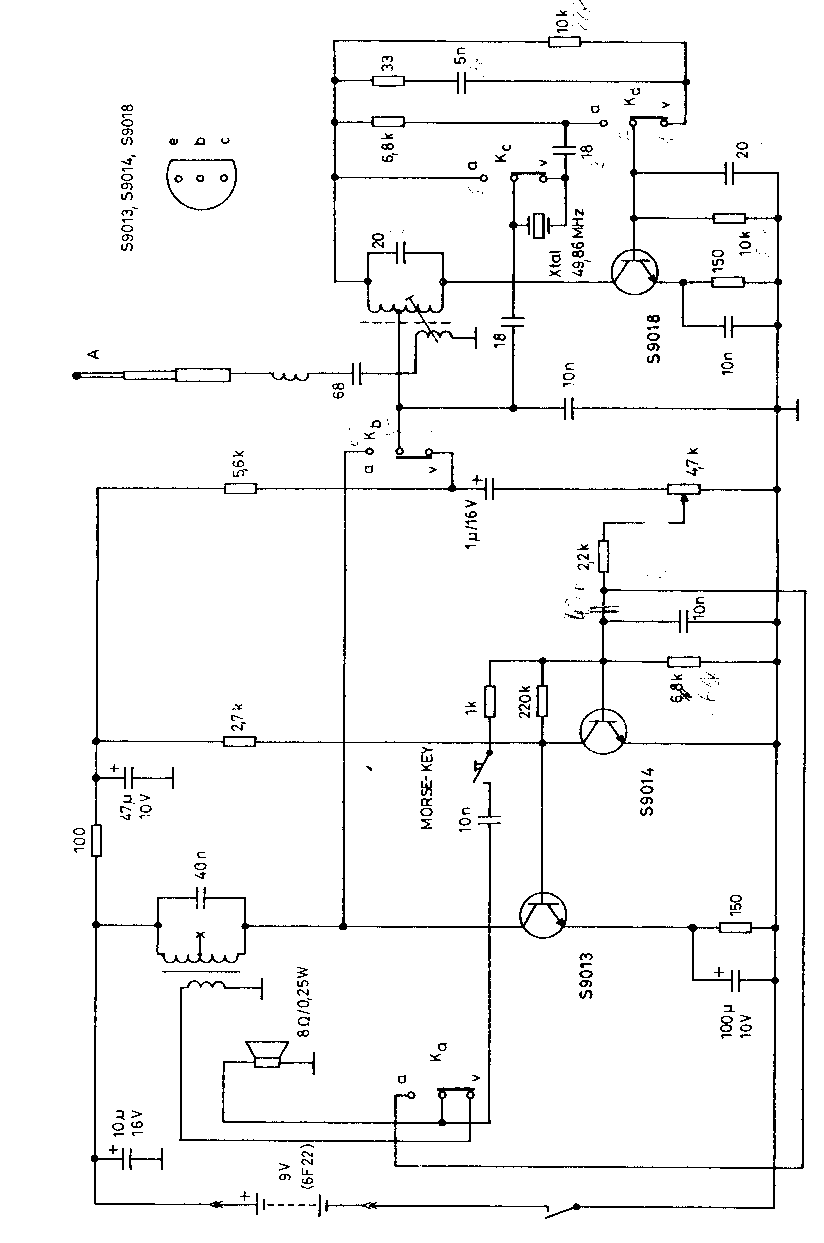
49MHz walkie-talkie

49MHz walkie-talkie
Here is a excellent walkie talkie circuit which acts as both the transmitter and reciever it self......
but be care ful even police patrols use these frequency of walkie talkies

click to enlarge

28 LED Clock Timer

28 LED Clock Timer


This is a programmable clock timer circuit that uses individual LEDs to indicate hours and minutes. 12 LEDs can be arranged in a circle to represent the 12 hours of a clock face and an additional 12 LEDs can be arranged in an outer circle to indicate 5 minute intervals within the hour. 4 additional LEDs are used to indicate 1 to 4 minutes of time within each 5 minute interval. The circuit is powered from a small 12.6 volt center tapped line transformer and the 60 cycle line frequency is used for the time base. The transformer is connected in a full wave, center tapped configuration which produces about 8.5 volts unregulated DC. A 47 ohm resistor and 5.1 volt, 1 watt zener regulate the supply for the 74HCT circuits. A 14 stage 74HCT4020 binary counter and two NAND gates are used to divide the line frequency by 3600 producing a one minute pulse which is used to reset the counter and advance the 4017 decade counter. The decade counter counts the minutes from 0 to 4 and resets on the fifth count or every 5 minutes which advances one section of a dual 4 bit binary counter (74HCT393). The 4 bits of this counter are then decoded into one of 12 outputs by two 74HCT138 (3 line to 8 line) decoder circuits. The most significant bit is used in conjunction with an inverter to select the appropriate decoder. During the first eight counts, the low state of the MSB is inverted to supply a high level to enable the decoder that drives the first 8 LEDs. During counts 9 to 12, the MSB will be high and will select the decoder that drives the remaining 4 LEDs while disabling the other decoder. The decoded outputs are low when selected and the 12 LEDs are connected common anode with a 330 ohm current limiting resistor to the +5 volt supply. The 5th output of the second decoder (pin 11) is used to reset the binary counter so that it counts to 11 and then resets to zero on the 12th count. A high reset level is required for the 393 counters, so the low output from the last decoder stage (pin 11) is inverted with one section of a 74HCT14 hex Schmitt trigger inverter circuit. A 10K resistor and 0.1uF cap are used to extend the reset time, ensuring the counter receives a reset signal which is much longer than the minimum time required. The reset signal is also connected to the clock input (pin 13) of the second 4 bit counter (1/2 74HCT393) which advances the hour LEDs and resets on the 12th hour in a similar manner. Setting the correct time is accomplished with two manual push buttons which feed the Q4 stage (pin 7) of the 4020 counter to the minute and hour reset circuits which advance the counters at 3.75 counts per second. A slower rate can be obtained by using the Q5 or Q6 stages. For test purposes, you can use Q1 (pin 9) which will advance the minutes at 30 per second. The time interval circuit (shown below the clock) consists of a SET/RESET flipflop made from the two remaining NAND gates (74HCT00). The desired time interval is programmed by connecting the anodes of the six diodes labeled start, stop and AM/PM to the appropriate decoder outputs. For example, to turn the relay on at 7:05AM and turn it off at 8:05AM, you would connect one of the diodes from the start section to the cathode of the LED that represents 7 hours, the second diode to the LED cathode that represents 5 minutes and the third diode to the AM line of the CD4013. The stop time is programmed in the same manner. Two additional push buttons are used to manually open and close the relay. The low start and stop signals at the common cathode connections are capacitively coupled to the NAND gates so that the manual push buttons can override the 5 minute time duration. That way, you can immediately reset the relay without waiting 5 minutes for the start signal to go away. The two power supply rectifier diodes are 1N400X variety and the switching diodes are 1N914 or 4148s but any general purpose diodes can be used. 0.1 uF caps (not shown on schematic) may be needed near the power pins of each IC. All parts should be available from Radio Shack with the exception of the 74HCT4017 decade counter which I didn't see listed. You can use either 74HC or 74HCT parts, the only difference between the two is that the input switching levels of the HCT devices are compatible with worst case TTL logic outputs. The HC device inputs are set at 50% of Vcc, so they may not work when driven from marginal TTL logic outputs. You can use a regular 4017 in place of the 74HCT4017 but the output current will much lower (less than 1 mA) and 4 additional transistors will be required to drive the LEDs. Without the buffer transistors, you can use a 10K resistor in place of the 330 and the LEDs will be visible, but very dim. Using the 4017 to drive LEDs with transistor buffers is shown in the "10 Channel LED Sequencer" at the top of this page.


click to enlarge


Time Interval Relay Circuitfor the clock circuit above


click to enlarge

72 LED Clock


72 LED Clock

In the circuit below, 60 individual LEDs are used to indicate the minutes of a clock and 12 LEDs indicate hours. The power supply and time base circuitry is the same as described in the 28 LED clock circuit above. The minutes section of the clock is comprised of eight 74HCT164 shift registers cascaded so that a single bit can be recirculated through the 60 stages indicating the appropriate minute of the hour. Only two of the minutes shift registers are shown connected to 16 LEDs. Pin 13 of each register connects to pin 1 of the next for 7 registers. Pin 6 of the 8th register should connect back to pin 1 of the first register using the 47K resistor. Pins 2,9,8, 14 and 7 of all 8 minutes registers (74HC164) should be connected in parallel (pin 8 to pin 8, pin 9 to pin 9, etc.). The hours section contains two 8 bit shift registers and works the same way as the minutes to display 1 of 12 hours. Pin 9 of all 74HCT164s (hours and minutes) should be connected together. For 50 Hertz operation, the time base section of the circuit can be modified as shown in the lower drawing labeled "50 Hertz LED Clock Time Base". You will need an extra IC (74HC30) to do this since it requires decoding 7 bits of the counter instead of 4. The two dual input NAND gates (1/2 74HC00) that are not used in the 50 Hertz modification should have their inputs connected to ground.
When power is applied, a single "1" bit is loaded into the first stage of both the minutes and hours registers. To accomplish this, a momentary low reset signal is sent to all the registers (at pin 9) and also a NAND gate to lock out any clock transitions at pin 8 of the minutes registers. At the same time, a high level is applied to the data input lines of both minutes and hours registers at pin 1. A single positive going clock pulse (at pin 8) is generated at the end of the reset signal which loads a high level into the first stage of the minutes register. The rising edge of first stage output at pin 3 advances the hours (at pin 8) and a single bit is also loaded into the hours register. Power should remain off for about 3 seconds or more before being re-applied to allow the filter and timing capacitors to discharge. A 1K bleeder resistor is used across the 1000uF filter capacitor to discharge it in about 3 seconds. The timing diagram illustrates the power-on sequence where T1 is the time power is applied and beginning of the reset signal, T2 is the end of the reset signal, T3 is the clock signal to move a high level at pin 1 into the first register, T4 is the end of the data signal. The time delay from T2 to T3 is exaggerated in the drawing and is actually a very short time of just the propagation delay through the inverter and gate.
Two momentary push buttons can be used to set the correct time. The button labeled "M" will increment the minutes slowly and the one labled "H" much faster so that the hours increment slowly. The hours should be set first, followed by minutes.


click to enlarge


click to enlarge

AM Radio Receiver Using the NE602 Balanced Mixer

AM Radio Receiver Using the NE602 Balanced Mixer


Pictured above is a little AM superhetrodyne receiver that covers the
broadcast band from 550 Khz to 1650 Khz. The circuit employs the 8 pin
Signetics balanced mixer IC (NE602) which converts the incoming RF signal
to the standard 455 Khz IF signal and provides about 13dB gain. The IF
signal is amplified by a single transistor stage and audio is recovered
using a biased shotkey diode (5082) and JFET buffer transistor. The LM386
audio amp is used to drive a small 2.5 inch speaker at about 200 milliwatts.
The circuit contains four LC tuned circuits, all of which need to be fine
tuned to obtain good results. An oscilloscope and RF signal generator are
useful, but the circuit can also be setup using local radio stations
and an additional portable AM radio.
For test purposes, the circuit can be assembled on a solderless breadboard
so changes can easily be made. Try to use short connections for the RF
section with the antenna loop a couple inches away from the board.
Assemble the NE602, ferrite antenna loopstick, tuning cap, oscillator coil
and associated other parts on the breadboard.
Next, connect the battery through a DMM and verify 3 or 4 milliamps of
current flow.
Next, adjust the tuning cap for maximum capacitance (550KHz) and connect
a scope to pin 6 of the NE602 and verify a approx 1 volt p-p sine waveform.
Adjust the red slug of the T1 oscillator coil for a frequency of about
1 MHz. Then adjust the capacitor to minimum capacitance and verify the
frequency increases to around 2Mhz.
To adjust the oscillator without a scope, use a portable AM radio to
verify the oscillator is working and the frequency is right. To do this,
place the portable radio close to the antenna coil and tune it to a AM
station around 1000 on the band. Set the circuit tuning dial to the station
frequency minus 455KHz. For example, if the portable radio is set to 1100,
the circuit tuning dial should point to (1100-455 = 645KHz). This doesn't
have to be exact, but set things as close as you can. Next, adjust the red
oscillator coil slug until a beat frequency is heard on the portable radio.
You should hear a squeal and then a null as the oscillator frequency gets
near the station point on the band. This will verify the oscillator is
running at about 455 Khz above the dial setting.
If the oscillator doesn't run, the problem may be the connections to the
(red) oscillator coil. The red oscillator coil will have 5 connections,
3 on one side for the tapped primary, and 2 on the other for the secondary.
The circuit requires only the single, tapped primary side, but unfortunately
the primary tap is too close to one end for the circuit to operate. To
overcome this problem, the secondary is added in series with the primary
which effectively moves the tap closer to the center and provides more
feedback to sustain oscillations. The phasing of the secondary connections
is also important. If the oscillator fails to work, try reversing the
connections to the secondary of the coil. When the oscillator is setup,
the remainder of the receiver can be assembled and calibrated.
If you have a signal generator, set it for 600KHz, 30% audio modulation
and 1 volt output. Connect the generator through a 1K resistor and a couple
turns of wire around the antenna loopstick. Adjust the yellow and black coil
slugs and also the position of the antenna coil on the loopstick for
strongest response. Reduce the generator output as the signal improves so
you can find a peak for all three coils. You can also make small adjustments
to the oscillator coil to get the tuning dial to point directly at 600.
This will calibrate the low end of the band. To calibrate the high end,
set the generator for some frequency near the high end, maybe 1500 on the
dial. Tune the receiver so it receives the signal and then adjust the two
trimmer capacitors located on the back of the tuning capacitor for best
response. You may find at this point the trimmer caps are all the way
closed or open and a peak cannot be found. To fix this problem, note which
way the caps are set and slightly adjust the main tuning dial to compensate.
For example, if the caps are all the way closed, move the tuning dial to a
lower setting (more capacitance) and then repeak the trimmers. Continue this
until you can find a peak where the trimmers caps are not fully closed or
open. At this point, repeat the adjustments at the low and high end until
both are optimum.
This same procedure can be done without the generator using a couple local
radio stations at opposite ends of the band. The first thing to do is
identify a station that can be heard somewhere on the band. Try to do this
without adding an external antenna, but if no stations are heard, add a short
2 foot wire antenna to the antenna input at the gate of the JFET. Find the
strongest station and slide the antenna coil along the loopstick for best
response and also adjust the yellow and black IF coils. Here is a step by
step procudure I found works reasonably well. My test station was located
at 790 on the band.
1. If no stations are heard, connect a short 2 foot wire antenna to the
junction of the antenna loopstick and gate of the JFET.
2. Adjust the tuning capacitor and slide the antenna coil for best response
of some local station.
3. Adjust the yellow and black slugs of T2 and T3 for loudest response.
4. Reduce the length of the wire antenna and readjust the position of the
antenna coil for best response.
5. Move the tuning dial slightly toward the correct point without losing the
station. (i.e.) If the station is located at 700 and your tuning dial is
pointing higher at 750, slightly move it down toward the correct 700 point
(more capacitance).
6. Readjust T2,T3 and antenna coil for best response.
7. Repeat steps 4, 5 and 6 until the station is heard loud and clear and
no further improvement can be made.
8. Remove the wire antenna and readjust the antenna coil, T2 and T3 for best
response. Note the antenna coil should not end up at the center of the
loopstick. This will indicate not enough inductance and a few more turns
of wire may be needed on the antenna coil. The optimum position for the
coil is near the center, slightly offset toward one end. If it ends up very
near one end of the stick, you may want to remove a few turns which will
allow the coil to be closer to the center.
9. At this point, several stations should be heard loud and clear but
minor adjustments may be needed to optimize the entire band. Select
a station near the bottom of the band (600KHz) and adjust the
antenna coil and oscillator coil for best response. Note that only
very small adjustments to the red oscillator coil may be needed.
Then select a station near the top of the band (1500Khz) and adjust
the 2 trimmer caps on the back of the main tuning capacitor for best
response. Repeat this process until both ends are optimized. Be sure
the 2 trimmer caps do not end up fully open or closed. If they do,
note the position and slightly adjust the main capacitor to compensate.
For example, if the trimmers are fully closed, adjust the main capacitor
slightly lower (more capacitance) and then readjust the trimmers
so the peak occurs somewhere between min and max.


AM Radio Receiver With Additional IF Stage


Pictured above is the same circuit with an additional IF stage added for
greater sensitivity. Overall gain can be adjusted with the 1K resistors
in the emitter leg of the 2N3904 transistors. The circuit board was assembled
using multiturn 10K pots in place of the 1K resistors and then adjusted for
best performance. The pots are the 2 little blue items just to the left of
the tuning cap. I think I ended up with about 750 ohms. The emitter bypass
caps are not needed since there is plenty of gain available without them.
The caps (two yellow items near the pots) are still in the board but not
connected. I didn't know if they were needed or not, so I put them in there
anyway and later disconnected them. Removing the bypass caps also increases
the input impedance so that both IF stages can use the black IF coils which
have higher secondary impedances (and thus more voltage) than the yellow or
white coils. You might be able to replace the yellow coil with a black one
for greater signal transfer since the input to the first transistor is much
higher without the bypass cap, but I didn't try it. You may notice one of the
black coils is actually white in the picture but it was rewound for a higher
secondary impedance. Actually, it was removed from a junk radio purchased for
a dollar and didn't have any secondary, so I added a 27 turn secondary which
is close to what the black coils use. Overall, the performance is very good
except for the AGC circuit, which has limited range and may not be able
to compensate for very strong stations which may overload the circuit.
The AGC voltage is derived from the IF amplitude at the cathode of the
detector diode (output of T4). As the IF amplitude increases, the DC
voltage at the gate of the JFET will move negative, below ground.
The audio signal is present on both the gate and source terminals of the
JFET, but the audio DC offset voltage will change as the IF amplitude
changes. This DC voltage (about 2 volts) is fed back through a 15K resistor
and the two IF coil secondaries to control the transistor bias points.
The audio signal is filtered out by the 47uF cap leaving a stable DC
voltage at the base of the transistors. As the base voltage drops, the
emitter voltages also drop resulting in less operating current and lower
gain for two IF stages. But the range is limited to maybe only 6-12dB
which isn't enough to compensate for very strong signals. One solution
to the problem is a manual gain control consisting of a switch and
a few turns of wire around the antenna coil which can be seen in the
picture (3 turns of solid insulated white wire on left side of loopstick).
Closing the switch loads the antenna coil and reduces the signal level.
Notes:
IF transformer data and Mouser part numbers can be found at:
http://www.electronics-tutorials.com/filters/if-amplifier-transformers.htm
There are a couple different versions of the yellow and black transformers.
The total turns used and position of the tap varies with the version.
I'm not sure which is better, or which ones I used since they were recovered
from old radios. However, either version should be driven using the
shortest section of the primary. This means connecting the transistor
collector to either the tap or the end closest to the tap and the power
connection to the other point. Leave the transformer end farthest from the
tap unconnected. You can use a DMM to measure the resistance from the tap to
each end of the primary to determine which end is closest to the tap.
Resistance will probably be a couple ohms or less.
A couple sources for ferrite rods for antenna loopsticks can be found at the
links below but the longer rods are expensive ($25 for a 5.6 inch rod).
The second source has 7.5 inch rods for $20. You may also find them on ebay.
http://www.stormwise.com/page26.htm
http://www.universal-radio.com/catalog/misc/amidon.html
A source for a miniture variable tuning capacitor was found at
"Ocean State Electronics" http://www.oselectronics.com/ose_p98.htm
Near the bottom of the page is the listing:
Miniature 2 Gang Poly-film Variable Tuning Capacitor For Broadcast Band
" Tunes AM band from 540Khz to 1600Khz. Ideal variable tuning capacitor
for miniature circuitry and use as exact-duplicate replacement in current
transistor receivers. Rotates through a full 180 degrees
Maximum capacity: Antenna section. 15-140PF, Oscillator section, 10-60PF.
Trimmer capacity: variable to over 12PF. Trimmer adjustment on rear of case.
Completely enclosed to clear polyethylene plastic case to protect plates.
Includes calibrated dial, screw, and knob.
Small size, 3/4" Square x 1/2" Deep.
BC-540...........$3.95 "
If you use this cap or similar from an old miniture radio, the antenna
loopstick inductance will need to be about 600uH to tune 550KHz with the
capacitance at maximum (140pF). This amounts to about 80 turns on a 4 inch,
3/8 diameter ferrite rod. Shorter rods will need more turns.


Loop Antenna for AM Radio


A loop antenna can greatly improve medium wave reception. Loop antennas
are directional and receive signals along the plane of the windings. The
directional quality improves signal to noise ratio of the desired signal
while rejecting signals perpendular to the plane of the windings. Larger
loops are better than smaller ones but good results can be obtained
from moderate sizes of one or two feet on a side. The shape doesn't
make much difference so the loop can be circular, rectangular or
a triangle shape. The main idea is to cover as much area as possible,
so I would imagine a circular loop would be the best. The loop pictured
here measures 15 inches on a side and is about 1.5 inches wide. It was
wound with 16 turns of #35 copper wire, and has a Q of about 100 at
600 KHz. Larger guage wire might have been better (less resistance)
and therefore higher Q and selectivity, but the arrangment here works
pretty well with a bandwidth of about 6Khz at 600Khz. The loop is tuned
with a 30-365 pF capacitor and covers the standard broadcast band of
550-1700 KHz. The antenna signal is inductively coupled to the radio's
internal ferrite rod antenna so no wire connections are needed.
Simply place the radio near the loop antenna and adjust the position(s)
for best results. You may have to adjust the tuning of both the radio
and antenna several times for optimum results.
More detailed information on loop antennas can be found at:
AM Loop Antennas
A calculator for figuring the number of turns needed for various
rectangular loops can be found here:

Loop Loop Antenna Calculator - By Bruce Carter

FM Beacon Broadcast Transmitter (88-108 MHz)

FM Beacon Broadcast Transmitter (88-108 MHz)

This circuit will transmit a continuous audio tone on the FM broadcast band (88-108 MHz) which could used for remote control or security purposes. Circuit draws about 30 mA from a 6-9 volt battery and can be received to about 100 yards. A 555 timer is used to produce the tone (about 600 Hz) which frequency modulates a Hartley oscillator. A second JFET transistor buffer stage is used to isolate the oscillator from the antenna so that the antenna position and length has less effect on the frequency. Fine frequency adjustment can be made by adjusting the 200 ohm resistor in series with the battery. Oscillator frequency is set by a 5 turn tapped inductor and 13 pF capacitor. The inductor was wound around a #8 X 32 bolt (about 3/16 diameter) and then removed by unscrewing the bolt. The inductor was then streached to about a 3/8 inch length and tapped near the center. The oscillator frequency should come out somewhere near the center of the band (98 MHz) and can be shifted higher or lower by slightly expanding or compressing the inductor. A small signal diode (1N914 or 1N4148) is used as a varactor diode so that the total capacity in parallel with the inductor varies slightly at the audio rate thus causing the oscillator frequency to change at the audio rate (600 Hz). The ramping waveform at pins 2 and 6 of the timer is applied to the reversed biased diode through a large (1 Meg) resistor so that the capacitance of the diode changes as the ramping voltage changes thus altering the frequency of the tank circuit. Alternately, an audio signal could be applied to the 1 Meg resistor to modulate the oscillator but it may require an additional pullup resistor to reverse bias the diode. The N channel JFET transistors used should be high frequency VHF or UHF types (Radio Shack #276-2062 MPF102) or similar.

click to enlarge

LED Photo Sensor


LED Photo Sensor

Here's a circuit that takes advantage of the photo-voltaic voltage of an ordinary LED. The LED voltage is buffered by a junction FET transistor and then applied to the inverting input of an op-amp with a gain of about 20. This produces a change of about 5 volts at the output from darkness to bright light. The 100K potentiometer can be set so that the output is around 7 volts in darkness and falls to about 2 volts in bright light.

click to enlarge
Micro Power AM Broadcast Transmitter

Micro Power AM Broadcast Transmitter

In this circuit, a 74HC14 hex Schmitt trigger inverter is used as a square wave oscillator to drive a small signal transistor in a class C amplifier configuration. The oscillator frequency can be either fixed by a crystal or made adjustable (VFO) with a capacitor/resistor combination. A 100pF capacitor is used in place of the crystal for VFO operation. Amplitude modulation is accomplished with a second transistor that controls the DC voltage to the output stage. The modulator stage is biased so that half the supply voltage or 6 volts is applied to the output stage with no modulation. The output stage is tuned and matched to the antenna with a standard variable 30-365 pF capacitor. Approximately 20 milliamps of current will flow in the antenna lead (at frequencies near the top of the band) when the output stage is optimally tuned to the oscillator frequency. A small 'grain of wheat' lamp is used to indicate antenna current and optimum settings. The 140 uH inductor was made using a 2 inch length of 7/8 inch (OD) PVC pipe wound with 120 turns of #28 copper wire. Best performance is obtained near the high end of the broadcast band (1.6 MHz) since the antenna length is only a very small fraction of a wavelength. Input power to the amplifier is less than 100 milliwatts and antenna length is 3 meters or less which complies with FCC rules. Output power is somewhere in the 40 microwatt range and the signal can be heard approximately 80 feet. Radiated power output can be approximated by working out the antenna radiation resistance and multiplying by the antenna current squared. The radiation resistance for a dipole antenna less than 1/4 wavelength is
R = 80*[(pi)^2]*[(Length/wavelength)^2]*(a factor depending on the form of the current distribution) The factor depending on the current distribution turns out to be [(average current along the rod)/(feed current)]^2 for short rods, which is 1/4 for a linearly-tapered current distribution falling to zero at the ends. Even if the rods are capped with plates, this factor cannot be larger than 1. Substituting values for a 9.8 foot dipole at a frequency of 1.6 MHz we get R= 790*.000354*.25 = .07 Ohms. And the resistance will be only half as much for a monopole or 0.035 Ohms. Radiated power at 20 milliamps works out to about I^2 * R = 14 microwatts.

click to enlarge

Salt Water Battery

Salt Water Battery
About 13 years ago, I made a salt water battery to operate a single AA battery quartz clock. It ran for several months until I got tired of adding water to compensate for evaporation. The batttery consisted of 5 cells each producing about 300 millivolts. As I remember, I used 5 small olive jars filled with about a cup of water and a tablespoon of salt to create 5 cells in series each producing about 300 millivolts for a total of around 1.5 volts. The positive electrode was made from a strip of double sided copper circuit board (about 1 inch by 4 inch) and the negative electrode was a similar sized strip of aluminum. I recently tried some galvanized iron instead of aluminum and found it produces a little higher voltage so the battery may be made with only 3 cells. But any two different metals used with salt water or citrus juice will create a low voltage battery. You might experiment using silver coins and copper pennies and various fruit juices to come up with a more powerful battery. The diagram below shows the 5 cells connected in series with the galvanized iron of one cell connected to the copper piece of the next. The battery produces a very low current of around 1 milliamp so it's not practical for much other than a quartz clock. You might get a low current LED to light using a few more cells and larger electrodes with greater surface area. You might also add a capacitor across the battery to supply higher current pulses for a flashing LED. It will probably operate the 1.5 volt flashing LED circuits shown on the main menu at a slow flash rate.

click to enlarge

Photo Electric Street Light

Photo Electric Street Light


This is basically a Schmitt Trigger circuit which receives input from a cadmium sulfide photo cell and controls a relay that can be used to switch off and on a street lamp at dawn and dusk. I have built the circuit with a 120 ohm/12 volt relay and monitored performance using a lamp dimmer, but did not connect the relay to an outside light.
The photo cell should be shielded from the lamp to prevent feedback and is usually mounted above the light on top of a reflector and pointed upward at the sky so the lamp light does not strike the photo cell and switch off the lamp.
The photo cell is wired in series with a potentiometer so the voltage at the junction (and base of transistor) can be adjusted to about half the supply, at the desired ambient light level. The two PNP transistors are connected with a common emitter resistor for positive feedback so as one transistor turns on, the other will turn off, and visa versa. Under dark conditions, the photo cell resistance will be higher than the potentiometer producing a voltage at Q1 that is higher than the base voltage at Q2 which causes Q2 to conduct and activate the relay.
The switching points are about 8 volts and 4 volts using the resistor values shown but could be brought closer together by using a lower value for the 7.5K resistor. 3.3K would move the levels to about 3.5 and 5.5 for a range of 2 volts instead of 4 so the relay turns on and off closer to the same ambient light level. The potentiometer would need to be readjusted so that the voltage is around 4.5 at the desired ambient condition.

LED Traffic Lights

LED Traffic Lights


The LED traffic Light circuit controls 6 LEDs (red, yellow and green) for both north/south directions and east/west directions. The timing sequence is generated using a CMOS 4017 decade counter and a 555 timer. Counter outputs 1 through 4 are wire ORed using 4 diodes so that the (Red - North/South) and (Green - East/West) LEDs will be on during the first four counts. The fifth count (pin 10) illuminates (Yellow - East/West) and (Red - North/South). Counts 6 through 9 are also wire ORed using diodes to control (Red - East/West) and (Green - North/South). Count 10 (pin 11) controls (Red - East/West) and (Yellow - North/South). The time period for the red and green lamps will be 4 times longer than for the yellow and the complete cycle time can be adjusted with the 47K resistor. The eight 1N914 diodes could be subsituted with a dual 4 input OR gate (CD4072).click to enlarge

LED mini schematics 2

LED mini schematics 2

AC Line powered LEDs

The circuit below illustrates powering a LED (or two) from the 120 volt AC line using a capacitor to drop the voltage and a small resistor to limit the inrush current. Since the capacitor must pass current in both directions, a small diode is connected in parallel with the LED to provide a path for the negative half cycle and also to limit the reverse voltage across the LED. A second LED with the polarity reversed may be subsituted for the diode, or a tri-color LED could be used which would appear orange with alternating current. The circuit is fairly efficient and draws only about a half watt from the line. The resistor value (1K / half watt) was chosen to limit the worst case inrush current to about 150 mA which will drop to less than 30 mA in a millisecond as the capacitor charges. This appears to be a safe value, I have switched the circuit on and off many times without damage to the LED. The 0.47 uF capacitor has a reactance of 5600 ohms at 60 cycles so the LED current is about 20 mA half wave, or 10 mA average. A larger capacitor will increase the current and a smaller one will reduce it. The capacitor must be a non-polarized type with a voltage rating of 200 volts or more.

The lower circuit is an example of obtaining a low regulated voltage from the AC line. The zener diode serves as a regulator and also provides a path for the negative half cycle current when it conducts in the forward direction. In this example the output voltage is about 5 volts and will provide over 30 milliamps with about 300 millivolts of ripple. Use caution when operating any circuits connected directly to the AC line.

Line Powered White LEDs

The LED circuit below is an example of using 25 white LEDs in series connected to the 120VAC line. It can be modified for more or less LEDs by adjusting the resistor value. The exact resistance will depend on the particular LEDs used. But working out the resistor value is a bit complicated since current will not continously flow through the resistor.

In operation, the output of the bridge rectifier will be about 120 DC RMS or 170 volts peak. If

we use 25 white LEDs with a forward voltage of 3 volts each, the total LED voltage will be 75 volts. The peak resistor voltage will be 170- 75 or 95 volts but the resistor voltage will not be continous since the input must rise above 75 before any current flows. This (dead time) represents about 26 degrees of the 90 degree half wave rectified cycle, (asin) 75/170 = (asin) .44 = 26 degrees. This means the resistor will conduct during 90-26 = 64 degrees, or about 71 percent of the time.

Next we can work out the peak LED current to determine the resistor value. If the LED current is 20mA RMS, the peak current will be 20*1.414 or 28mA. But since the duty cycle is only 71 percent, we need to adjust this figure up to 28/0.71 = 39mA. So, the resistor value should be

95/.039 = 2436 ohms (2.4K) and the power rating will be .02^2 *2400= .96 watts. A two watt size is recommended.

Now this circuit can also be built using 2 diodes and resistor as shown in the lower drawing. The second diode in parallel with the LEDs is used to avoid a reverse voltage on the LEDs in case the other diode leaks a little bit. It may not be necessary but I thought it was a good idea.

Working out the resistor value is similar to the other example and comes out to about half the value of the full wave version, or about 1.2K at 1 watt in this case. But the peak LED current will be twice as much or about 78mA. This is probably not too much, but you may want to look up

the maximum current for short duty cycles for the LEDs used and insure 79mA doesn't exceed the spec.


LED mini schematics 1

555 Tone Generator (8 ohm speaker)

This is a basic 555 squarewave oscillator used to produce a 1 Khz tone from an 8 ohm speaker. In the circuit on the left, the speaker is isolated from the oscillator by the NPN medium power transistor which also provides more current than can be obtained directly from the 555 (limit = 200 mA). A small capacitor is used at the transistor base to slow the switching times which reduces the inductive voltage produced by the speaker. Frequency is about 1.44/(R1 + 2*R2)C where R1 (1K) is much smaller than R2 (6.2K) to produce a near squarewave. Lower frequencies can be obtained by increasing the 6.2K value, higher frequencies will probably require a smaller capacitor as R1 cannot be reduced much below 1K. Lower volume levels can be obtained by adding a small resistor in series with the speaker (10-100 ohms). In the circuit on the right, the speaker is directly driven from the 555 timer output. The series capacitor (100 uF) increases the output by supplying an AC current to the speaker and driving it in both directions rather than just a pulsating DC current which would be the case without the capacitor. The 51 ohm resistor limits the current to less than 200 mA to prevent overloading the timer output at 9 volts. At 4.5 volts, a smaller resistor can be used.

click to enlarge

Generating -5 Volts From a 9 Volt Battery


A 555 timer can be used to generate a squarewave to produce a negative voltage relative to the negative battery terminal. When the timer output at pin 3 goes positive, the series 22 uF capacitor charges through the diode (D1) to about 8 volts. When the output switches to ground, the 22 uF cap discharges through the second diode (D2) and charges the 100 uF capacitor to a negative voltage. The negative voltage can rise over several cycles to about -7 volts but is limited by the 5.1 volt zener diode which serves as a regulator. Circuit draws about 6 milliamps from the battery without the zener diode connected and about 18 milliamps connected. Output current available for the load is about 12 milliamps. An additional 5.1 volt zener and 330 ohm resistor could be used to regulate the +9 down to +5 at 12 mA if a symmetrical +/- 5 volt supply is needed. The battery drain would then be around 30 mA.

click to enlarge

Transistor / Diode / IC (DIP) Outlines


click to enlarge

1.5 Volt LED Flashers


The LED flasher circuits below operate on a single 1.5 volt battery. The circuit on the upper right uses the popular LM3909 LED flasher IC and requires only a timing capacitor and LED.

The top left circuit, designed by Andre De-Guerin illustrates using a 100uF capacitor to double the battery voltage to obtain 3 volts for the LED. Two sections of a 74HC04 hex inverter are used as a squarewave oscillator that establishes the flash rate while a third section is used as a buffer that charges the capacitor in series with a 470 ohm resistor while the buffer output is at +1.5 volts. When the buffer output switches to ground (zero volts) the charged capacitor is placed in series with the LED and the battery which supplies enough voltage to illuminate the LED. The LED current is approximately 3 mA, so a high brightness LED is recommended.

In the other two circuits, the same voltage doubling principle is used with the addition of a

transistor to allow the capacitor to discharge faster and supply a greater current (about 40 mA peak). A larger capacitor (1000uF) in series with a 33 ohm resistor would increase the flash duration to about 50mS. The discrete 3 transistor circuit at the lower right would need a resistor (about 5K) in series with the 1uF capacitor to widen the pulse width.

click to enlarge

Infrared beam barrier/ proximity sensor

Infrared beam barrier/ proximity sensor
This circuit can be used as an Infrared beam barrier as well as a proximity detector.
The circuit uses the very popular Sharp IR module (Vishay module can also be used). The pin nos. shown in the circuit are for the Sharp & VIshay modules. For other modules please refer to their respective datasheets.

The receiver consists of a 555 timer IC working as an oscillator at about 38Khz (also works from 36kHz to 40kHz) which has to be adjusted using the 10K preset. The duty cycle of the IR beam is about 10%. This allows us to pass more current through the LEDS thus achieving a longer range.CLICK TO ENLARGE
The receiver uses a sharp IR module. When the IR beam from the transmitter falls on the IR module, the output is activated which activates the relay and de-activated when the beam is obstructed. The relay contacts can be used to turn ON/OFF alarms, lights etc. The 10K preset should be adjusted until the receiver detects the IR beam.

The circuit can also be used as a proximity sensor, i.e to detect objects in front of the device without obstructing a IR beam. For this the LEDs should be pointed in the same direction as the IR module and at the same level. The suggested arrangement is shown in the circuit diagram. The LEDs should be properly covered with a reflective material like glass or aluminum foils on the sides to avoid the spreading of the IR beam and to get a sharp focus of the beam.
When there is nothing in front of them, the IR beam is not reflected onto the module and hence the circuit is not activated. When an object comes near the device, the IR light from the LEDs is reflected by the object onto the module and hence the circuit gets activated.

If there still a lot of mis-triggering, use a 1uF or higher capacitor instead of the 0.47uF.


Infra Red Switch


IR ON/OFF SWITCH
Description:

This is a single channel (on / off) universal switch that may be used with any Infra Red remote control using 36-38kHz. (This is a very common remote handset frequency). In place of IR1 a TSOP1738 receiver may be used.CLICK TO ENLARGE

Notes:
Any "button" of any remote control may be used to work this universal switch. The button must be pressed for about one and a half seconds (determined by R3 and C2) before the relay will operate. The circuit will remain in this state (latched) until reset. To reset, any button is pressed on the remote handset and held for a short duration.
For example, if you were watching TV, you could press and hold any button on the TV remote to trigger the circuit. In order not to change channel, you could press the button of the channel you are watching. You can connect anything to the relay, for example a lamp, but make sure that the relay contacts
can handle the rated voltage and current.

Circuit Operation:
IC1 is an Infra Red module. IR modulated pulses are received and buffered by this IC. It has a standard TTL output, the output with no signal is held high by R1. A replacement for IR1 is the common TSOP1738 IR reciver. One gate of a CMOS inverter drives LED1 as a visible switching aid. An
other gate buffers the signal and applies it to the time constant circuit, comprising R3,C2,R4 and D1. C2 charges via R3, and discharges via R4, D1 prevents quick discharge via the low output impedance of the CMOS buffer. If using a TSOP1738 then increase R4 to 470k.

The time taken to charge a capacitor is the product of resistance and capacitance, more commonly known as the RC time constant. At one RC a capacitor will only charge to 63% of the supply voltage. It takes 5 RC's for a capacitor to reach 99% charge. In this circuit the capacitor charge has to reach the logic threshold
of the CMOS invertor. As the power supply is 5 Volts, the input threshold is around 3.6V, which takes about 3RC's or about 1.5 seconds. Once reached the inventor triggers the 555 timer and operates the flip flop. A simulation of received pulses, filtering and output pulse is shown below. Note that this is not from the actual circuit ( in which case the reconstructed pulse would be high for the duration of the 555 monostable) but only a spice simulation.
CLICK TO ENLARGE

The pulses are further buffered and contain "jaggered edges" as shown above. These edges are produced by the modulated IR data, and have to be removed. This is achieved using a 555 timer wired as a monostable, IC3, having an output pulse duration R5, C4. A clean output pulse is produced to activate the bistable latch, IC4. This is a D type flip flop, built with a TTL 7474 series IC and configured as a bistable. Any version of the 7474 may be used, i.e. schottky 74LS74, high speed 74HCT74 etc. The input is applied to the clock pin, the inverted output fed back to the data input and clear and preset lines are tied to ground. For every pulse the relay will operate and latch, the next pulse will turn off the relay and so on. Note that quick turn on and off of the relay is not possible. The output pulse is set at about 2.4 seconds. and input delay by R3, C2 set about 1.5 seconds.

Parts List:
R1 3k3
R2 1k
R3 22k
R4 220k or 470k if using a TSOP1738
R5 1M
R6 3k3
B1 12 V
D1 1N4148
D2 1N4003
Q1 B109
LED1 CQX35A
IC1 IR1 available from Harrison Electronics or TSOP1838 or similar
IC2 4049
IC3 CA555
IC4 SN74HCT74 or SN74LS74
IC5 LM7805
Relay 12 Volt coil with changeover contact
C1 100u
C2 22u
C3 100n
C4 2u2


FM Transmitter

FM Transmitter


A Very Simple FM Transmitter.
To make it even Simpler I have incorporated the Oscillator Coil on the PCB.It also has a Few Taps on it to change the Frequency if needed.This is in Addition to the Trimmer Cap to fine tune the frequency.
However it still needs another 1 Mhy choke, but its value is not as critical.
Depending on local conditions, the Range is a few hundred feet using a 10 inch wire antenna.
This circuit is Quite stable, Unless you put your hand or other objects too near the Antenna.


CLICK TO ENLARGE


WIRELESS IR HEADPHONE TRANSMITTER

WIRELESS IR HEADPHONE TRANSMITTER


 The transmitter for the wireless headphones is built around a CD4046 CMOS phase-locked loop, coupled with a driver transistor, and a pair of infrared LEDs.
Although the CD4046 is comprised of two phase comparators, a voltage-controlled oscillator (or VCO), a source follower, and a zener reference, only its VCO is used in this application.
click to enlarge circuit

WIRELESS IR HEADPHONE RECEIVER

WIRELESS IR HEADPHONE RECEIVER

IR detector diode D1 intercepts the IR signal at around 40 kHz and feed
s it from U1, a high-gain preamp, to PLL, U2, a 4046 configured to serve as an FM detector. U3 is an audio amplifier that feeds a pair of headphones or a speaker.